
Python Database Connectivity
Python Database Connectivity (PDBC) वह Process है जिसके द्वारा Python Program किसी Database (जैसे MySQL, SQLite, PostgreSQL, Oracle आदि) से जुड़ता है और उसमें Data Store, Retrieve, Update तथा Delete करता है।
सरल शब्दों में, Python और Database के बीच Connection स्थापित करने की technic को Python Database Connectivity कहते हैं।
Need of Database Connectivity
- Data Storage : बड़ी मात्रा में डेटा को सुरक्षित रूप से collect करने के लिए किया जाता है।
- Data Retrieval : आवश्यक डेटा को जल्दी और आसानी से प्राप्त करने के लिए किया जाता है।
- Data Update : पुराने डेटा को आवश्यकतानुसार बदलने या अपडेट करने के लिए किया जाता है।
- Data Deletion : अनावश्यक या गलत डेटा को हटाने के लिए किया जाता है।
- Security : डेटा को अनधिकृत (Unauthorized) पहुँच से सुरक्षित रखने के लिए किया जाता है।
- Multi-user Access : एक ही Database को कई उपयोगकर्ताओं द्वारा एक साथ उपयोग करने के लिए किया जाता है।
- Real-time Applications : Banking, Hospital, E-commerce और Student Management जैसी Applications में तुरंत डेटा उपलब्ध कराने के लिए किया जाता है।
Database Connectivity Architecture
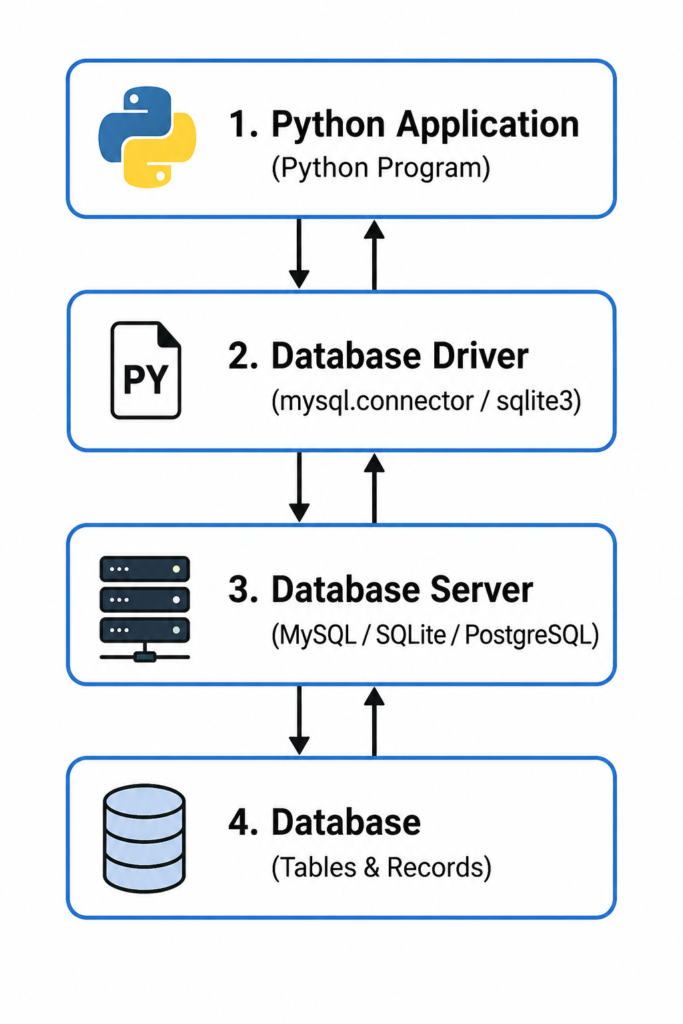
Python by supported Database
| Database | Python Module / Driver | Uses |
|---|---|---|
| SQLite | sqlite3 | छोटे एवं Embedded Applications के लिए |
| MySQL | mysql-connector-python | Web Applications एवं Business Applications |
| PostgreSQL | psycopg2 | Enterprise एवं Large Scale Applications |
| Oracle Database | oracledb (पूर्व में cx_Oracle) | Banking एवं Enterprise Systems |
| Microsoft SQL Server | pyodbc | Windows एवं Enterprise Applications |
| MariaDB | mariadb | MySQL का Open Source विकल्प |
| MongoDB (NoSQL) | pymongo | JSON आधारित एवं Big Data Applications |
| Redis | redis-py | Caching एवं Real-time Applications |
| IBM Db2 | ibm_db | Enterprise एवं Business Solutions |
| Firebird | fdb | Desktop एवं Small Business Applications |
Components of Database connectivity
| Component | Function |
|---|---|
| Python Application | Python Program जो Database पर कार्य करता है। |
| Database Driver | Python और Database के बीच Connection स्थापित करता है। (जैसे mysql.connector, sqlite3) |
| Connection Object | Database Server से Connection बनाता है। |
| Cursor Object | SQL Queries को Execute करता है तथा Result प्राप्त करता है। |
| SQL Query | Data पर CRUD (Create, Read, Update, Delete) Operation करती है। |
| Database Server | Data को Process एवं Manage करता है। (जैसे MySQL, PostgreSQL) |
| Database | Tables के रूप में Data को Store करता है। |
| Commit | किए गए Changes को स्थायी (Permanent) रूप से Save करता है। |
| Rollback | Error होने पर किए गए Changes को वापस (Undo) करता है। |
| Close() | Connection एवं Resources को सुरक्षित रूप से बंद करता है। |
Steps of Database Connectivity
Step 1: Database Driver Import करें
सबसे पहले आवश्यक Database Driver या Module को Import किया जाता है।
Example :
import mysql.connectorया SQLite के लिए:
import sqlite3Step 2: Database से Connection बनाएँ
Database Server से Connection establish किया जाता है।
Example :
import mysql.connector

conn = mysql.connector.connect(
    host="localhost",
    user="root",
    password="1234",
    database="college"
)
Step 3: Cursor Object बनाएँ
Cursor Object SQL Queries को Execute करने के लिए उपयोग किया जाता है।
Example :
cursor = conn.cursor()Step 4: SQL Query Execute करें
Database पर आवश्यक SQL Query चलाएँ।
Example :
cursor.execute("SELECT * FROM student")Step 5: Result प्राप्त करें
Query का Result प्राप्त करके प्रदर्शित करें।
Example :
rows = cursor.fetchall()

for row in rows:
    print(row)
Step 6: Changes Save करें (Commit)
यदि Data में बदलाव (INSERT, UPDATE, DELETE) किया गया है, तो उसे Save करें।
Example :
conn.commit()Step 7: Connection बंद करें
कार्य पूरा होने के बाद Database Connection बंद करें।
Example :
conn.close()CRUD Operation
CRUD operation का meaning Create, Read, Update और Delete है। ये Database के चार मुख्य Operations हैं जिनकी सहायता से Python Program Database में नया Data add, Data read, Data update तथा Data remove करता है।
CRUD Operation
| Operation | SQL Command | work |
|---|---|---|
| Create | INSERT | Database में नया Data जोड़ता है। |
| Read | SELECT | Database से Data प्राप्त करता है। |
| Update | UPDATE | पहले से मौजूद Data को बदलता है। |
| Delete | DELETE | Database से Data हटाता है। |
1. Create (INSERT)
Syntax:
INSERT INTO table_name(column1, column2)
VALUES(value1, value2);
Python Example:
import mysql.connector

conn = mysql.connector.connect(
    host="localhost",
    user="root",
    password="1234",
    database="college"
)

cursor = conn.cursor()

sql = "INSERT INTO student(id, name) VALUES(%s, %s)"
value = (101, "Rahul")

cursor.execute(sql, value)
conn.commit()

print("Record Inserted Successfully")

conn.close()
2. Read (SELECT)
Syntax:
SELECT * FROM table_name;Python Example:
import mysql.connector

conn = mysql.connector.connect(
    host="localhost",
    user="root",
    password="1234",
    database="college"
)

cursor = conn.cursor()

cursor.execute("SELECT * FROM student")

rows = cursor.fetchall()

for row in rows:
    print(row)

conn.close()
3. Update (UPDATE)
Syntax:
UPDATE table_name
SET column_name = value
WHERE condition;
Python Example:
import mysql.connector

conn = mysql.connector.connect(
    host="localhost",
    user="root",
    password="1234",
    database="college"
)

cursor = conn.cursor()

sql = "UPDATE student SET name=%s WHERE id=%s"
value = ("Amit", 101)

cursor.execute(sql, value)
conn.commit()

print("Record Updated Successfully")

conn.close()
4. Delete (DELETE)
Syntax:
DELETE FROM table_name
WHERE condition;
Python Example:
import mysql.connector

conn = mysql.connector.connect(
    host="localhost",
    user="root",
    password="1234",
    database="college"
)

cursor = conn.cursor()

sql = "DELETE FROM student WHERE id=%s"
value = (101,)

cursor.execute(sql, value)
conn.commit()

print("Record Deleted Successfully")

conn.close()
Database Connectivity के लाभ (Advantages)
- Data सुरक्षित रहता है।
- बड़ी मात्रा में Data आसानी से Manage किया जा सकता है।
- Data को जल्दी Search किया जा सकता है।
- Multi-user Access संभव होता है।
- Backup एवं Recovery आसान होती है।
- Data Redundancy कम होती है।
- बड़े Applications के लिए उपयुक्त है।
- Data की Accuracy बढ़ती है।
- Automation आसान होती है।
- Real-time Applications में उपयोगी है।
Database Connectivity की सीमाएँ (Disadvantages)
- Database Server की आवश्यकता हो सकती है।
- Setup थोड़ा जटिल हो सकता है।
- Network Failure से Connection प्रभावित हो सकता है।
- Security Configuration की आवश्यकता होती है।
- Performance Database Server पर निर्भर करती है।
- Driver Install करना पड़ता है।
- Maintenance की आवश्यकता होती है।
उपयोग (Applications)
- Banking System
- Hospital Management System
- Student Management System
- Library Management System
- E-commerce Website
- Employee Management System
- Online Shopping Portal
- Railway Reservation System
- College Management System
- Inventory Management System
- Python Full Course Roadmap 2026Python Introduction↓Python Installation & Setup↓Python Basics↓Variables & Data Types↓Operators↓Conditional Statements↓Loops↓Functions↓Data Structures↓File Handling↓Exception Handling↓Object Oriented Programming (OOP)↓Modules & Libraries↓Advanced Python↓Database Connectivity↓Web Development↓Data Science & AI↓Automation & Projects↓Python Developer
- What is Python in Hindi (Basic to advanced)Introduction and History Introduction for Python Python History Python Features Python Applications Applications Uses 1. Artificial Intelligence (AI) and Machine Learning Python का उपयोग AI models, Machine Learning algorithms, Chatbots, Face Recognition, Voice Assistant और Prediction systems बनाने के लिए किया जाता है। 2. Data Science and Data Analysis Python से बड़े datasets को analyze… Read more: What is Python in Hindi (Basic to advanced)
- Python Keywords in Hindi (easy to understand )Python Keywords में ऐसे special word होते हैं जिनका Python भाषा में पहले से एक Predefined meaning होता है। Python Interpreter इन words को पहचानता है और इनके अनुसार कार्य करता है। Example : No. Keyword हिंदी में अर्थ Uses (उपयोग) Syntax 1 False गलत False keywords का use Boolean False value के लिए किया… Read more: Python Keywords in Hindi (easy to understand )
- Python Variables in Hindi (Easy to understand)what is Variable Assigning Value to variable Source Code : Output : 5 Hello [2, 5, 9] Changing Variable’s Values Source Code : Output : 5Hello[4, 5, 8] Assigning Single Value to Multiple Variables Source Code : Output : HelloHelloHelloHello Assigning Value to Variable according to order Source Code : Output : 1H[1, 2] Variable… Read more: Python Variables in Hindi (Easy to understand)
- Python Data Types in Hindi (easy to understand)Python में Data Type यह बताता है कि किसी variable में किस प्रकार का data store है। Python में data type को manually declare नहीं करना पड़ता, Python interpreter value देखकर data type पहचान लेता है। Example : Number Python में Number Data Types का उपयोग संख्याओं (Numbers) को store और process करने के लिए… Read more: Python Data Types in Hindi (easy to understand)