
Introduction and History
Introduction for Python
- Python सभी Programming Languages में से सबसे आसान Language है |
- Python एक High-Level Object-Oriented Programming Language है |
- Python में जैसे English Language होती है लगभग वैसे ही code python language में होता है |
- Python Language open source Language है | यह किसी OS Platform पर free में उपलब्ध है |
- अगर Python Language को सीखना हो तो किसी भी Basic Programming Language की जरुरत नहीं है |
Python History
- Python Language को ‘Guido Van Rossum’ ने सबसे पहले dutch programmer को developed किया था |
- Python की शुरुआत 1980 में की और एक साल बाद Python को 1991 में लॉन्च किया गया था
Python Features
- Easy to Learn
- Easy to Understand
- Easy to Read
- Portable
- Large Number of Libraries
- Open-Source and Free
- Object-Oriented
- Embeddable
- Extensible
- Easy to Learn : Python Language C, C++ और java Language जैसी programming language है इस language में ज्यादा keywords ना होने की वजह से काफी आसानी से सीखी जा सकती है |
- Easy to Understand : Python Language में Plain English के जैसे syntax होने की वजह से काफी आसानी से समझ में आ जाती है |
- Easy to Read : Python Language में syntax ज्यादा Complex ना होने के कारण इसे आसानी से पढ़ा जा सकता है |
- Simple : Python Language पढ़ने और समझने में बहुत ही आसान है | ये Language पढ़ने में ज्यादातर plain English जैसी होती है |
- Portable : Python का program एक platform(OS) से दूसरे platform पर port करके execute किया जाता है|
- Large Number of Libraries : Python में बहुत सारी libraries होती है जिससे किसी specific code को अलग से नहीं लिखना पड़ता है |
- Open-Source and Free : Python का software फ्री में उपलब्ध है | इसे चलाने के लिए Paid नहीं करना पड़ता है | Python का code पढ़ा जा सकता है या उसमे कुछ changes भी किये जा सकते है | इसको बिजनेस के रूप में भी use किया जा सकता है |
- Object-Oriented : C++ और Java के साथ ये Language भी एक Object-Oriented Language है | Object-Oriented होने के कारण Program को समझने मैं आसान होता है |
- Embeddable : Python को C, C++ etc. Languages के साथ embed किया जा सकता है |
- Extensible : अगर किसी दूसरे language का code अच्छे से work नहीं कर रहा है या slow से work कर रहा है तो उसके changes में Python को used किया जा सकता है |
Python Applications
- Artificial intelligence and machine learning
- Data Science and Data Analysis
- Cyber security and ethical hacking
- IOT (internet of things)
- Scientific and Computational Applications
- Web Applications
- Gaming Applications
- ERP Applications
- Graphical Applications
| Applications | Uses |
|---|---|
| 1. Artificial Intelligence (AI) and Machine Learning | Python का उपयोग AI models, Machine Learning algorithms, Chatbots, Face Recognition, Voice Assistant और Prediction systems बनाने के लिए किया जाता है। |
| 2. Data Science and Data Analysis | Python से बड़े datasets को analyze किया जाता है, data visualization, statistical analysis और reports तैयार की जाती हैं। |
| 3. Cyber Security and Ethical Hacking | Python का उपयोग security tools बनाने, network scanning, vulnerability testing, malware analysis, automation scripts और penetration testing में किया जाता है। |
| 4. Internet of Things (IoT) | Python का उपयोग smart devices, sensors, Raspberry Pi projects, home automation और IoT systems को control करने के लिए किया जाता है। |
| 5. Scientific and Computational Applications | Python का उपयोग scientific research, mathematical calculations, simulations, physics, chemistry और engineering problems को solve करने में किया जाता है। |
| 6. Web Applications | Python से websites और web applications का backend बनाया जाता है। इसका उपयोग APIs, database management और server-side programming में होता है। |
| 7. Gaming Applications | Python का उपयोग 2D games, game prototypes और educational games बनाने के लिए किया जाता है। |
| 8. ERP Applications | Python का उपयोग Enterprise Resource Planning (ERP) software बनाने में किया जाता है, जिसमें business management, accounting, inventory और HR systems शामिल होते हैं। |
| 9. Graphical Applications | Python से GUI (Graphical User Interface) applications बनाए जाते हैं जैसे calculator, text editor, desktop software और management tools। |
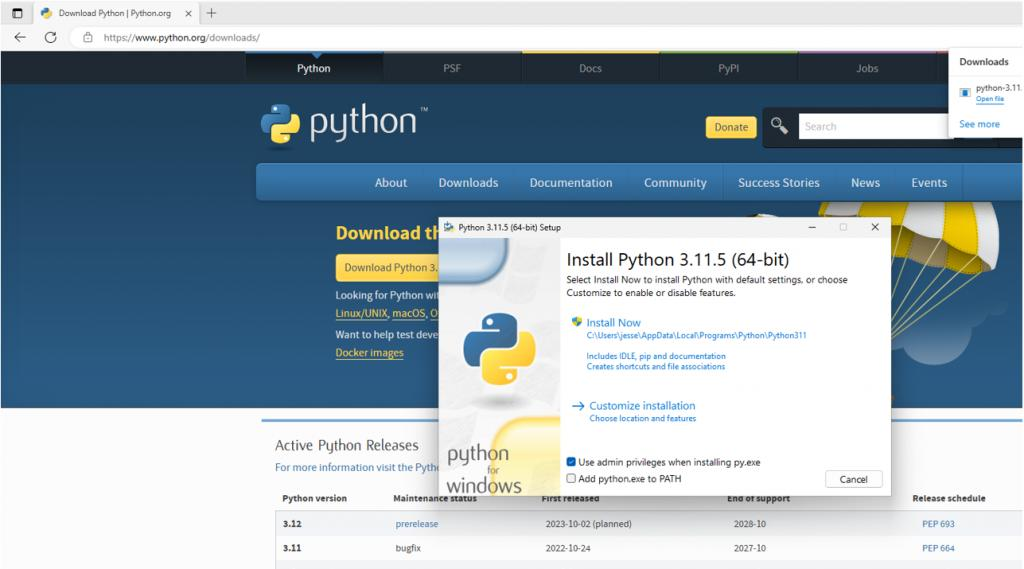
Step 1: Python Download करें
- Browser खोलें।
- Python की official website पर जाएं:
Python Official Website - Downloads पर क्लिक करें।
- Windows के लिए latest Python version डाउनलोड करें।
Step 2: Python Install करें
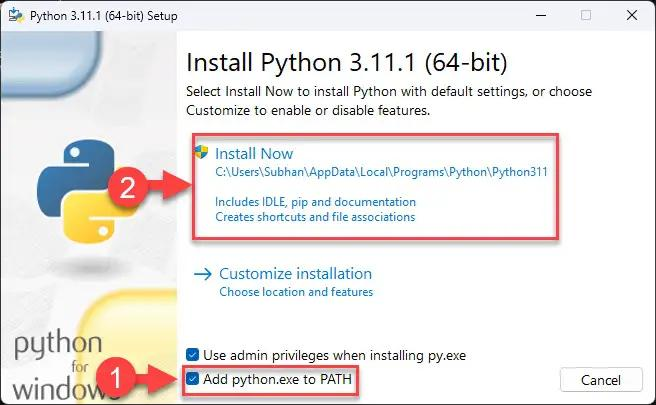
- Download हुई
.exefile को open करें। - सबसे पहले नीचे दिया हुआ option जरूर select करें:
✅ Add python.exe to PATH
- अब Install Now पर क्लिक करें।
Step 3: Installation Check करें
- Windows में Command Prompt (CMD) खोलें।
- यह command लिखें:
python --versionअगर installation सही है तो ऐसा दिखेगा:
Python 3.x.x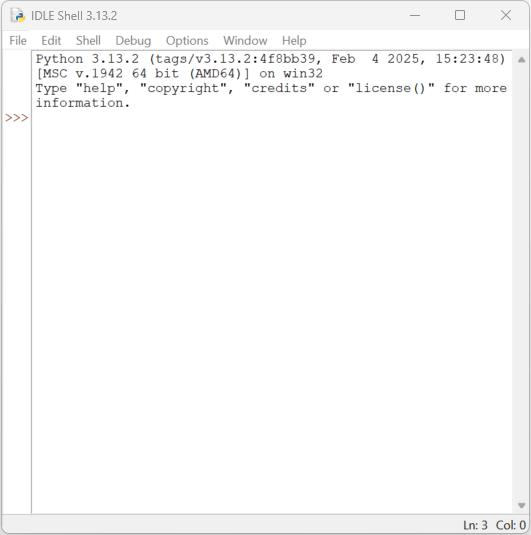
Step 4: Python Interpreter Check करें
CMD में लिखें:
pythonOutput:
Python 3.x.x
>>>
अब Python commands चला सकते हैं।
Test करें:
print("Hello Python")Output: Hello Python