HTML Layout का मतलब है वेब पेज के अलग-अलग हिस्सों को सही जगह पर arrange करने के लिए किया जाता है | जैसे Header, Menu, Content, Sidebar, Footer आदि | HTML Layout का उपयोग वेबसाइट को सुंदर और उपयोगी बनाने में किया जाता है
HTML में मुख्य रूप से 3 प्रकार की Layout Techniques का उपयोग किया जाता है:
- Div Layout
- Semantic Layout
- Responsive Layout
1. Div Layout (<div>)
Div Layout HTML में सबसे पुरानी और Simple Techniques है। <div> टैग का उपयोग वेबपेज के अलग-अलग भाग बनाने के लिए किया जाता है | <div> एक कंटेनर की तरह काम करता है जिसमें HTML के सभी Element का group बनाता है |
Div Layout Structure :
--------------------------------
|            Header            |
--------------------------------
|     Menu     |    Content    |
--------------------------------
|            Footer            |
--------------------------------
Example :
<!DOCTYPE html>
<html>
<head>
<title>Div Layout</title>

<style>
.header{
    background-color: lightblue;
    padding:20px;
}

.menu{
    background-color: lightgray;
    width:30%;
    float:left;
    height:200px;
}

.content{
    background-color:white;
    width:70%;
    float:right;
    height:200px;
}

.footer{
    background-color:black;
    color:white;
    padding:20px;
    clear:both;
}
</style>

</head>

<body>

<div class="header">
<h1>My Website</h1>
</div>

<div class="menu">
<h3>Menu</h3>
<p>Home</p>
<p>About</p>
</div>

<div class="content">
<h3>Content</h3>
<p>Website Content Here</p>
</div>

<div class="footer">
<p>Copyright 2026</p>
</div>

</body>
</html>
Output :

Advantages :
- Div Layout को सीखना आसान है।
- इसका उपयोग पुराने वेबसाइट के प्रोजेक्ट बनाने में किया जाता है |
- इसका उपयोग CSS के साथ आसानी से किया जाता है |
Disadvantages :
- Large code को समझना मुश्किल हो सकता है।
- SEO के लिए कम अच्छा होता है।
2. Semantic Layout
Semantic Layout का उपयोग ऐसे टैग के लिए किया जाता है जिनका Meaning (अर्थ) होता है | इसमें <div> की जगह Meaningful Tags का उपयोग होता है।
Main Semantic Tags :
| Tag | उपयोग |
|---|---|
<header> | वेबसाइट का ऊपर वाला भाग |
<nav> | Navigation Menu |
<main> | मुख्य Content |
<section> | Content का भाग |
<article> | स्वतंत्र Article |
<aside> | Sidebar |
<footer> | नीचे का भाग |
Semantic Layout Structure :
--------------------------------
|          Header              |
--------------------------------
|          Navigation          |
--------------------------------
| Sidebar |     Main Content   |
--------------------------------
|          Footer              |
--------------------------------
Example :
<!DOCTYPE html>
<html>

<body>

<header>
<h1>My Website</h1>
</header>


<nav>
<a href="#">Home</a>
<a href="#">About</a>
</nav>


<main>

<section>
<h2>Welcome</h2>
<p>This is main content.</p>
</section>


<article>
<h2>Article Title</h2>
<p>Article Details</p>
</article>


<aside>
<h3>Sidebar</h3>
</aside>

</main>


<footer>
<p>Copyright 2026</p>
</footer>
</body>

</html>
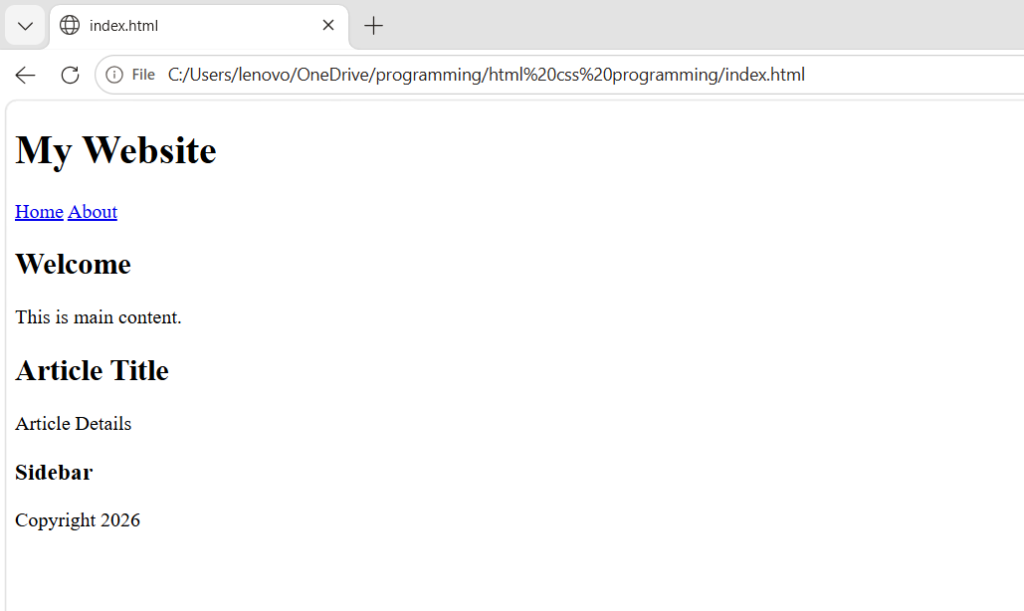
Output :
Advantages :
- Code साफ और समझने में आसान होता है।
- SEO बेहतर होता है।
- Screen readers के लिए अच्छा होता है।
- Modern websites में ज्यादा उपयोग होता है।
3. Responsive Layout
Responsive Layout का उपयोग वेबसाइट को अलग-अलग स्क्रीन पर सही तरीके से दिखाने के लिए किए जाता है |
जैसे:
- Computer
- Laptop
- Tablet
- Mobile
पर वेबसाइट अपने आप Adjust हो जाए।
Responsive Layout में उपयोग होने वाली चीजें:
1. CSS Media Query
Example:
@media screen and (max-width:600px){

.container{
    width:100%;
}

}
जब स्क्रीन की Width 600px से कम होगी तो डिजाइन बदल जाएगा।
2. Flexible Images
img{
max-width:100%;
height:auto;
}
Image स्क्रीन के अनुसार Adjust होगी।
3. Flexbox Layout
Example:
.container{
display:flex;
gap:20px;
}
Flexbox से Elements को आसानी से Arrange कर सकते हैं।
4. CSS Grid Layout
Example:
.container{

display:grid;

grid-template-columns:repeat(3,1fr);

}
Grid से Rows और Columns में Layout बना सकते हैं।