
1. Bold Tag (<b>)
Bold tag का उपयोग text को मोटा (Bold) दिखाने के लिए किया जाता है। यह केवल टेक्स्ट का रूप बदलता है, उसके महत्व को नहीं दर्शाता।
Syntax :
<b> this is bold text </b>
Example :
<!DOCTYPE html>
<html lang="en">
<head>
    <meta charset="UTF-8">
    <meta name="viewport" content="width=device-width, initial-scale=1.0">
    <title>My First Page</title>
</head>
<body>
    <b> this is bold text </b>
</body>
</html>
Output :
this is bold text
उपयोग :
- Title या Special word को मोटा दिखाने के लिए किया जाता है।
- Important word को हाइलाइट करने के लिए किया जाता है।
2. Strong tag (<strong>)
Strong tag किसी text के importance को दर्शाने के लिए उपयोग किया जाता है। यह सामान्यतः Bold दिखाई देता है, लेकिन इसका अर्थ केवल स्टाइल नहीं बल्कि importance भी होता है।
Syntax :
<strong> important information </strong>Example :
<!DOCTYPE html>
<html lang="en">
<head>
    <meta charset="UTF-8">
    <meta name="viewport" content="width=device-width, initial-scale=1.0">
    <title>My First Page</title>
</head>
<body>
    <strong> important information </strong>
</body>
</html>
Output :
important information
उपयोग :
- Strong tag का उपयोग चेतावनी (Warning) देने के लिए भी किया जाता है |
- Strong tag का उपयोग महत्वपूर्ण निर्देश (Instructions) दिखाने के लिए किया जाता है |
- Strong tag का उपयोग विशेष जानकारी देने के लिए भी किया जाता है |
3. Italic Tag (<i>)
Italic tag का उपयोग टेक्स्ट को तिरछा (Italic) दिखाने के लिए उपयोग किया जाता है।
Syntax :
<i> this is italic text </i>Example :
<!DOCTYPE html>
<html lang="en">
<head>
    <meta charset="UTF-8">
    <meta name="viewport" content="width=device-width, initial-scale=1.0">
    <title>My First Page</title>
</head>
<body>
    <i> this is italic text </i>
</body>
</html>
Output :
this is italic text
उपयोग :
- Italic tag का उपयोग विदेशी शब्द लिखने के लिए किया जाता है।
- Italic tag का उपयोग पुस्तक या फिल्म के नाम लिखने के लिए किया जाता है।
- Italic tag का उपयोग विशेष शब्द लिखने के लिए किया जाता है।
4. Emphasized Tag (<em>)
Emphasized tag का उपयोग किसी शब्द या वाक्य पर विशेष जोर देने के लिए उपयोग किया जाता है। यह भी Italic दिखाई देता है।
Syntax :
<em> this is Emphasized tag </em>
Example :
<!DOCTYPE html>
<html lang="en">
<head>
    <meta charset="UTF-8">
    <meta name="viewport" content="width=device-width, initial-scale=1.0">
    <title>My First Page</title>
</head>
<body>
   <em> this is Emphasized tag </em>
</body>
</html>
Output :
this is Emphasized tag
उपयोग :
- Emphasized tag का उपयोग किसी शब्द पर जोर देने के लिए किया जाता है।
- Emphasized tag का उपयोग महत्वपूर्ण वाक्य को उभारने के लिए किया जाता है।
5. Underline Tag (<u>)
Underline टैग का उपयोग टेक्स्ट के नीचे रेखा खींचने के लिए उपयोग किया जाता है।
Syntax
<u>Underline Text</u>Example :
<!DOCTYPE html>
<html lang="en">
<head>
    <meta charset="UTF-8">
    <meta name="viewport" content="width=device-width, initial-scale=1.0">
    <title>My First Page</title>
</head>
<body>
   <u>this is underline </u>
</body>
</html>
Output :
this is underline
उपयोग :
- Underline टैग का उपयोग महत्वपूर्ण शब्दों को रेखांकित करने के लिए किया जाता है।
- Underline टैग का उपयोगनोट्स या विशेष जानकारी दिखाने के लिए किया जाता है।
6. Highlighted Text Tag (<mark>)
Mark टैग टेक्स्ट को हाइलाइट (Highlight) करने के लिए उपयोग किया जाता है। डिफॉल्ट रूप से इसका बैकग्राउंड पीला होता है।
Syntax :
<mark>Highlighted Text</mark>Example :
<!DOCTYPE html>
<html lang="en">
<head>
    <meta charset="UTF-8">
    <meta name="viewport" content="width=device-width, initial-scale=1.0">
    <title>My First Page</title>
</head>
<body>
   <mark>Highlighted Text</mark>
</body>
</html>
Output :
Highlighted Text
उपयोग :
- Highlighted Text Tag का उपयोग महत्वपूर्ण जानकारी को दर्शाने के लिए किया जाता है।
- Highlighted Text Tag का उपयोग सर्च रिजल्ट में शब्द हाइलाइट करने के लिए किया जाता है।
7. Small Tag (<small>)
Small Tag का उपयोग टेक्स्ट का आकार छोटा करने के लिए उपयोग किया जाता है।
Syntax :
<small>Small Text</small>Example :
<!DOCTYPE html>
<html lang="en">
<head>
    <meta charset="UTF-8">
    <meta name="viewport" content="width=device-width, initial-scale=1.0">
    <title>My First Page</title>
</head>
<body>
   <small> this is small tag </small>
</body>
</html>
Output :
this is small tag
उपयोग :
- Small Tag का उपयोग कॉपीराइट सूचना बताने के लिए किए जाते हैं |
- Small Tag का उपयोग नोट्स और अतिरिक्त जानकारी बताने के लिए किए जाते हैं |
8. Deleted Tag (<del>)
Deleted Tag का उपयोग हटाए गए टेक्स्ट को दर्शाने के लिए उपयोग किया जाता है। इसके ऊपर एक लाइन दिखाई देती है।
Syntax :
<del>deleted tag </del>Example :
<!DOCTYPE html>
<html lang="en">
<head>
    <meta charset="UTF-8">
    <meta name="viewport" content="width=device-width, initial-scale=1.0">
    <title>My First Page</title>
</head>
<body>
   <del>This is deleted Tag </del>
</body>
</html>
Output :
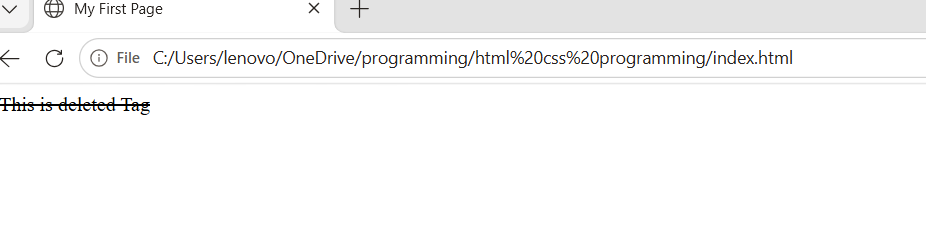
उपयोग :
- Deleted tag का उपयोग पुरानी कीमत दिखाने के लिए किया जाता है।
- Deleted tag का उपयोग हटाई गई जानकारी दर्शाने के लिए किया जाता है।
9. <ins> Tag (Inserted Text)
<ins> टैग नए जोड़े गए टेक्स्ट को दर्शाता है। इसके नीचे लाइन दिखाई देती है।
Syntax :
<ins>₹800</ins>Example :
<!DOCTYPE html>
<html lang="en">
<head>
    <meta charset="UTF-8">
    <meta name="viewport" content="width=device-width, initial-scale=1.0">
    <title>My First Page</title>
</head>
<body>
   <p>नई कीमत: <ins>₹800</ins></p>
</body>
</html>
Output :
नई कीमत: ₹800
उपयोग :
- Inserted tag का उपयोग अपडेट की गई जानकारी दिखाने के लिए किया जाता है।
- Inserted tag का उपयोग नए टेक्स्ट को दर्शाने के लिए किया जाता है।
10. <sub> Tag (Subscript Text)
<sub> टैग टेक्स्ट को नीचे की ओर छोटा करके दिखाता है।
Syntax
H<sub>2</sub>OExample
<!DOCTYPE html>
<html lang="en">
<head>
    <meta charset="UTF-8">
    <meta name="viewport" content="width=device-width, initial-scale=1.0">
    <title>My First Page</title>
</head>
<body>
  <p>Water Formula: H<sub>2</sub>O</p>
</body>
</html>
Output :
Water Formula: H2O
उपयोग :
- <sub> tag का उपयोग रासायनिक सूत्र (Chemical Formulas) के लिए किया जाता है।
- <sub> tag का उपयोग गणितीय अभिव्यक्तियाँ के लिए किया जाता है।
11. <sup> Tag (Superscript Text)
<sup> टैग टेक्स्ट को ऊपर की ओर छोटा करके दिखाता है।
Syntax :
x<sup>2</sup>Example :
<!DOCTYPE html>
<html lang="en">
<head>
    <meta charset="UTF-8">
    <meta name="viewport" content="width=device-width, initial-scale=1.0">
    <title>My First Page</title>
</head>
<body>
  <p>x<sup>2</sup> + y<sup>2</sup></p>
</body>
</html>
Output :
x2 + y2
उपयोग :
- <sup> tag का उपयोग गणितीय घात (Powers) के लिए किया जाता है।
- <sup> tag का उपयोग फुटनोट (Footnotes) के लिए किया जाता है।
12. <pre> Tag (Preformatted Text)
<pre> टैग टेक्स्ट को उसी रूप में दिखाता है जैसा लिखा गया है। इसमें स्पेस और लाइन ब्रेक सुरक्षित रहते हैं।
Syntax :
<pre>
Name : Rahul
City : Khargone
</pre>
Example
<!DOCTYPE html>
<html lang="en">
<head>
    <meta charset="UTF-8">
    <meta name="viewport" content="width=device-width, initial-scale=1.0">
    <title>My First Page</title>
</head>
<body>
  <pre>
Name : Rahul
City : Khargone
</pre>
</body>
</html>
Output :
Name : Rahul
City : Khargone
उपयोग :
- <pre> tag का उपयोग कोड दिखाने के लिए किया जाता है।
- <pre> tag का उपयोग टेक्स्ट फॉर्मेटिंग सुरक्षित रखने के लिए किया जाता है।